class: center, middle, inverse, title-slide .title[ # Welcome! ] .subtitle[ ## Intro to visualizations, simple visualizations for continuous variables and string data, and downloading data from API, ] .author[ ### Maithreyi Gopalan ] .date[ ### Week 2 ] --- layout: true <script> feather.replace() </script> <div class="slides-footer"> <span> <a class = "footer-icon-link" href = "https://github.com/maithgopalan/c2-dataviz-2026/raw/main/static/slides/w2.pdf"> <i class = "footer-icon" data-feather="download"></i> </a> <a class = "footer-icon-link" href = "https://dataviz-win2026.netlify.app/slides/w2.html"> <i class = "footer-icon" data-feather="link"></i> </a> <a class = "footer-icon-link" href = "https://github.com/maithgopalan/c2-dataviz-2026"> <i class = "footer-icon" data-feather="github"></i> </a> </span> </div> --- # Agenda .pull-left[ * Visualizing distributions + histograms + density plots + Empirical cumulative density plots + QQ plots * Visualizing amounts + bar plots + dot plots + heatmaps ] .pull-right[ * Working textual data + Splitting into words, n-grams + Visualizing word frequencies * Cleaning string data + Substrings, basic transformations + Substitutions and quick pattern matching * Using API keys to download data + Understand packages/wrappers in R to download data ] -- You will have **at least 1 hour of lab that directly follows (or are minor extensions of) the codes you see in lecture today** ! --- # Learning Objectives * Understand various ways the same underlying data can be displayed * Think through pros/cons of each * Understand the basic structure of the code to produce the various plots * Create structured data from text and be able to visualize word frequencies * Be able to replace patterns in strings and understand which character need to be "escaped" * Using API keys, downloading data using R packages --- class: inverse-red center middle # One continuous variable --- # Histogram 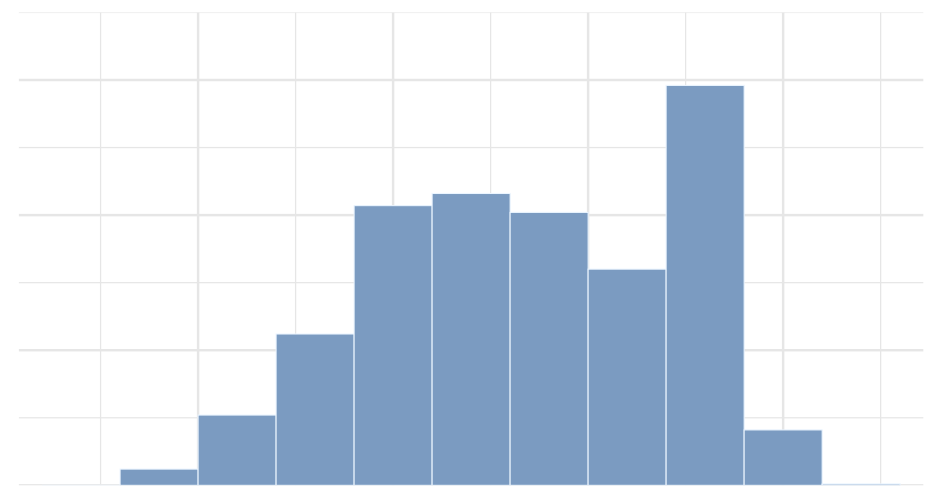 --- # Density plot 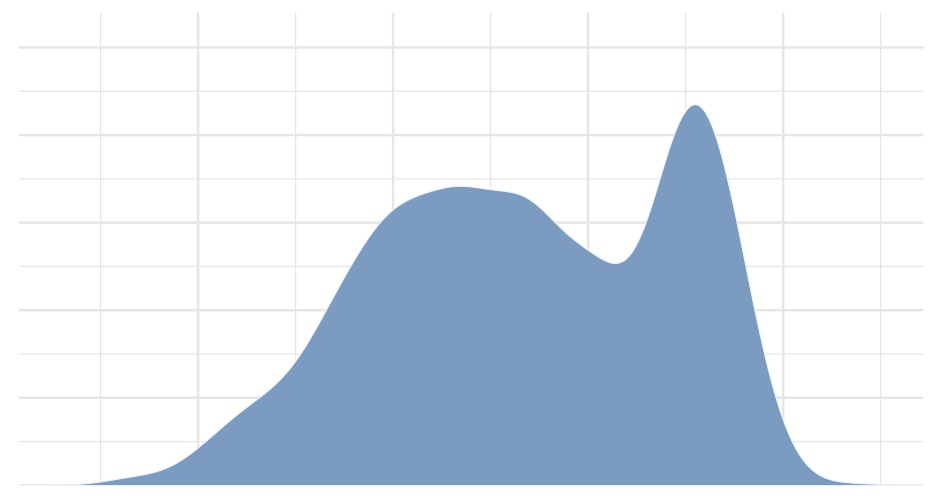 --- # (Empirical) Cumulative Density 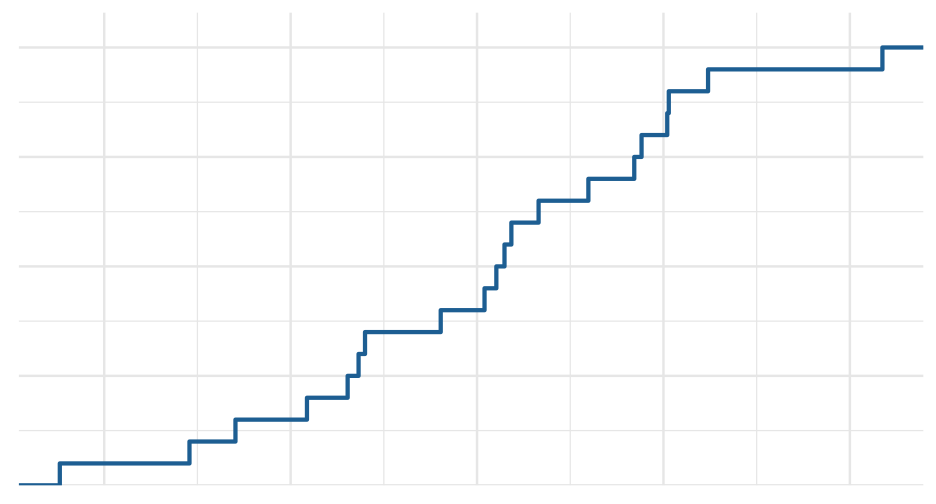 --- # QQ Plot Compare to theoretical quantiles (for normality) 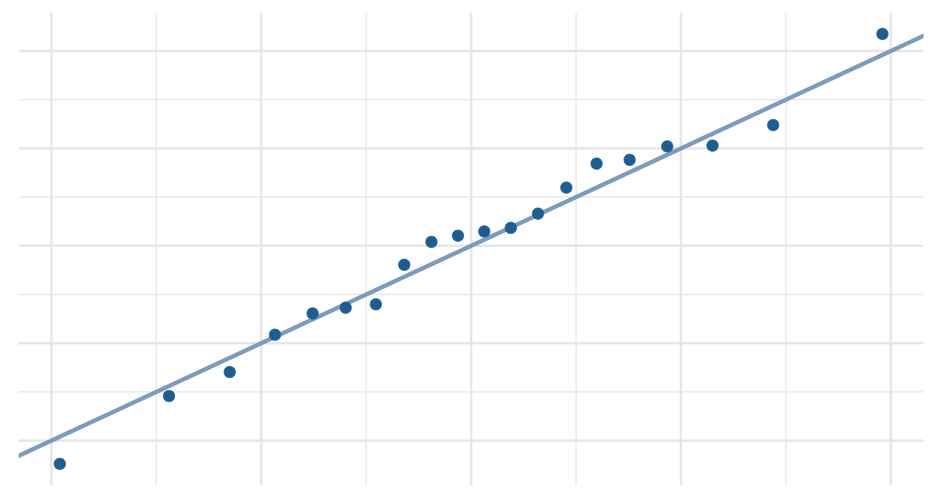 --- # Empirical examples I am going to go slow on this example section, so if you want to follow along, that will be a good idea; and can help you in the lab later today! --- background-image:url(https://allisonhorst.github.io/palmerpenguins/reference/figures/lter_penguins.png) background-size: contain # Penguin data --- ``` r library(palmerpenguins) penguins ``` ``` ## # A tibble: 344 × 8 ## species island bill_length_mm bill_depth_mm flipper_length_mm body_mass_g sex year ## <fct> <fct> <dbl> <dbl> <int> <int> <fct> <int> ## 1 Adelie Torgersen 39.1 18.7 181 3750 male 2007 ## 2 Adelie Torgersen 39.5 17.4 186 3800 female 2007 ## 3 Adelie Torgersen 40.3 18 195 3250 female 2007 ## 4 Adelie Torgersen NA NA NA NA <NA> 2007 ## 5 Adelie Torgersen 36.7 19.3 193 3450 female 2007 ## 6 Adelie Torgersen 39.3 20.6 190 3650 male 2007 ## 7 Adelie Torgersen 38.9 17.8 181 3625 female 2007 ## 8 Adelie Torgersen 39.2 19.6 195 4675 male 2007 ## 9 Adelie Torgersen 34.1 18.1 193 3475 <NA> 2007 ## 10 Adelie Torgersen 42 20.2 190 4250 <NA> 2007 ## # ℹ 334 more rows ``` --- # Basic histogram ``` r ggplot(penguins, aes(x = bill_length_mm)) + geom_histogram() ``` ``` ## `stat_bin()` using `bins = 30`. Pick better value with `binwidth`. ``` <img src="w2_files/figure-html/age_hist-1.png" width="70%" style="display: block; margin: auto;" /> --- # Make it a little prettier ``` r ggplot(penguins, aes(x = bill_length_mm)) + geom_histogram(fill = "#56B4E9", color = "white", alpha = 0.9) ``` ``` ## `stat_bin()` using `bins = 30`. Pick better value with `binwidth`. ``` <img src="w2_files/figure-html/age_hist2-1.png" width="70%" style="display: block; margin: auto;" /> --- # Change the number of bins ``` r ggplot(penguins, aes(x = bill_length_mm)) + geom_histogram(fill = "#56B4E9", color = "white", alpha = 0.9, * bins = 50) ``` <img src="w2_files/figure-html/age_hist50-1.png" width="70%" style="display: block; margin: auto;" /> --- # Vary the number of bins <img src="w2_files/figure-html/bins-1.png" width="70%" style="display: block; margin: auto;" /> --- # Denisty plot ### ugly 😫 ``` r ggplot(penguins, aes(bill_length_mm)) + geom_density() ``` <img src="w2_files/figure-html/dens-titanic-1.png" width="70%" style="display: block; margin: auto;" /> --- # Denisty plot ### Change the fill 😌 ``` r ggplot(penguins, aes(bill_length_mm)) + geom_density(fill = "#56B4E9") ``` <img src="w2_files/figure-html/dens-titanic-blue-1.png" width="70%" style="display: block; margin: auto;" /> --- # Density plot estimation * Kernal density estimation + Different kernal shapes can be selected + Bandwidth matters most + Smaller bands = bend more to the data * Approximation of the underlying continuous probability function + Integrates to 1.0 (y-axis is somewhat difficult to interpret) --- # Denisty plot ### change the bandwidth ``` r ggplot(penguins, aes(bill_length_mm)) + geom_density(fill = "#56B4E9", bw = 5) ``` <img src="w2_files/figure-html/dens-titanic5-1.png" width="70%" style="display: block; margin: auto;" /> --- class: middle <img src="w2_files/figure-html/vary-bw-1.png" width="70%" style="display: block; margin: auto;" /> --- # Quickly How well does it approximate a normal distribution? ``` r ggplot(penguins, aes(sample = bill_length_mm)) + stat_qq_line(color = "#56B4E9") + geom_qq(color = "gray40") ``` <img src="w2_files/figure-html/qq-titanic-1.png" width="70%" style="display: block; margin: auto;" /> --- class: inverse-red center middle # Grouped data ### Distributions How do we display more than one distribution at a time? --- # Boxplots  --- # Violin plots  --- # Jittered points  --- # Sina plots  --- # Stacked histograms  --- # Overlapping densities  --- # Ridgeline densities  --- class: inverse-orange center middle # Quick empirical examples --- # Boxplots ``` r ggplot(penguins, aes(island, bill_length_mm)) + geom_boxplot(fill = "#A9E5C5") ``` <img src="w2_files/figure-html/boxplots-empirical-1.png" width="70%" style="display: block; margin: auto;" /> --- # Violin plots ``` r ggplot(penguins, aes(island, bill_length_mm)) + geom_violin(fill = "#A9E5C5") ``` <img src="w2_files/figure-html/violin-empirical-1.png" width="70%" style="display: block; margin: auto;" /> --- # Jittered point plots ``` r ggplot(penguins, aes(island, bill_length_mm)) + geom_jitter(width = 0.3, height = 0) ``` <img src="w2_files/figure-html/jittered-empirical-1.png" width="70%" style="display: block; margin: auto;" /> --- # Sina plot ``` r ggplot(penguins, aes(island, bill_length_mm)) + ggforce::geom_sina() ``` <img src="w2_files/figure-html/sina-empirical-1.png" width="70%" style="display: block; margin: auto;" /> --- # Stacked histogram ``` r ggplot(penguins, aes(bill_length_mm)) + geom_histogram(aes(fill = island)) ``` <img src="w2_files/figure-html/stacked-histo-empirical-1.png" width="70%" style="display: block; margin: auto;" /> -- .realbig[🤨] --- # Dodged ``` r ggplot(penguins, aes(bill_length_mm)) + geom_histogram(aes(fill = island), position = "dodge") ``` <img src="w2_files/figure-html/dodged-histo-empirical-1.png" width="70%" style="display: block; margin: auto;" /> -- Note `position = "dodge"` does not go into `aes` (not accessing a variable in your dataset) --- # Better ``` r ggplot(penguins, aes(bill_length_mm)) + geom_histogram(fill = "#A9E5C5", color = "white", alpha = 0.9,) + * facet_wrap(~island) ``` <img src="w2_files/figure-html/wrapped-histo-empirical-1.png" width="70%" style="display: block; margin: auto;" /> --- # Overlapping densities ``` r ggplot(penguins, aes(bill_length_mm)) + geom_density(aes(fill = island), color = "white", alpha = 0.4) ``` <img src="w2_files/figure-html/overlap-dens-empirical-1.png" width="70%" style="display: block; margin: auto;" /> -- Note the default colors generally don't work great in most of these --- ``` r darken <- function(color, factor = 1.1) { sapply(color, function(col) { rgb.val <- col2rgb(col) rgb(t(pmax(0, pmin(255, rgb.val * factor))), maxColorValue = 255) }) } ggplot(penguins, aes(bill_length_mm)) + geom_density(aes(color = island, fill = island), alpha = 0.6) + scale_fill_manual(values = c("#003326", "#009973", "#d6fff5")) + scale_color_manual( values = darken(c("#003326", "#009973", "#d6fff5"), .1) ) ``` <img src="w2_files/figure-html/overlap-dens-empirical2-1.png" width="70%" style="display: block; margin: auto;" /> --- # Ridgeline densities ``` r ggplot(penguins, aes(bill_length_mm, island)) + ggridges::geom_density_ridges(color = "white", fill = "#A9E5C5") ``` <img src="w2_files/figure-html/ridgeline-dens-empirical-1.png" width="70%" style="display: block; margin: auto;" /> --- class: inverse-red center middle # Visualizing amounts --- class: inverse-blue center middle # Data viz in the wild Kat? Ziyuan? --- class: inverse-red center middle # Visualizing amounts --- # Bar plots  --- # Flipped bars  --- # Dotplot  --- # Heatmap  --- # Empirical examples ### How much does college cost? ``` r library(here) library(rio) tuition <- import(here("data", "us_avg_tuition.xlsx"), setclass = "tbl_df") head(tuition) ``` ``` ## # A tibble: 6 × 13 ## State `2004-05` `2005-06` `2006-07` `2007-08` `2008-09` `2009-10` `2010-11` `2011-12` `2012-13` `2013-14` `2014-15` `2015-16` ## <chr> <dbl> <dbl> <dbl> <dbl> <dbl> <dbl> <dbl> <dbl> <dbl> <dbl> <dbl> <dbl> ## 1 Alabama 5683. 5841. 5753. 6008. 6475. 7189. 8071. 8452. 9098. 9359. 9496. 9751. ## 2 Alaska 4328. 4633. 4919. 5070. 5075. 5455. 5759. 5762. 6026. 6012. 6149. 6571. ## 3 Arizona 5138. 5416. 5481. 5682. 6058. 7263. 8840. 9967. 10134. 10296. 10414. 10646. ## 4 Arkansas 5772. 6082. 6232. 6415. 6417. 6627. 6901. 7029. 7287. 7408. 7606. 7867. ## 5 California 5286. 5528. 5335. 5672. 5898. 7259. 8194. 9436. 9361. 9274. 9187. 9270. ## 6 Colorado 4704. 5407. 5596. 6227. 6284. 6948. 7748. 8316. 8793. 9293. 9299. 9748. ``` --- # By state: 2015-16 ``` r ggplot(tuition, aes(State, `2015-16`)) + geom_col() ``` <img src="w2_files/figure-html/state-tuition1-1.png" width="70%" style="display: block; margin: auto;" /> -- .realbig[🤮🤮🤮] --- # Two puke emoji version .realbig[🤮🤮] ``` r ggplot(tuition, aes(State, `2015-16`)) + geom_col() + theme(axis.text.x = element_text(angle = 45, hjust = 1, size = 10)) ``` <img src="w2_files/figure-html/state-tuition2-1.png" width="70%" style="display: block; margin: auto;" /> --- # One puke emoji version .realbig[🤮] ``` r ggplot(tuition, aes(State, `2015-16`)) + geom_col() + coord_flip() ``` --- <img src="w2_files/figure-html/state-tuition3-eval-1.png" width="70%" style="display: block; margin: auto;" /> --- # Kinda smiley version .realbig[😏] ``` r ggplot(tuition, aes(fct_reorder(State, `2015-16`), `2015-16`)) + geom_col() + coord_flip() ``` --- <img src="w2_files/figure-html/state-tuition4-eval-1.png" width="70%" style="display: block; margin: auto;" /> --- # Highlight Oregon .realbig[🙂] ``` r ggplot(tuition, aes(fct_reorder(State, `2015-16`), `2015-16`)) + geom_col() + geom_col(fill = "cornflowerblue", data = filter(tuition, State == "Oregon")) + coord_flip() + labs(x = "State", y = "Tuition (2015-16)") ``` --- <img src="w2_files/figure-html/oregon-highlight-eval-1.png" width="70%" style="display: block; margin: auto;" /> --- # Not always good to sort  --- # Much better  --- # Average tuition by year ### How? ``` r head(tuition) ``` ``` ## # A tibble: 6 × 13 ## State `2004-05` `2005-06` `2006-07` `2007-08` `2008-09` `2009-10` `2010-11` `2011-12` `2012-13` `2013-14` `2014-15` `2015-16` ## <chr> <dbl> <dbl> <dbl> <dbl> <dbl> <dbl> <dbl> <dbl> <dbl> <dbl> <dbl> <dbl> ## 1 Alabama 5683. 5841. 5753. 6008. 6475. 7189. 8071. 8452. 9098. 9359. 9496. 9751. ## 2 Alaska 4328. 4633. 4919. 5070. 5075. 5455. 5759. 5762. 6026. 6012. 6149. 6571. ## 3 Arizona 5138. 5416. 5481. 5682. 6058. 7263. 8840. 9967. 10134. 10296. 10414. 10646. ## 4 Arkansas 5772. 6082. 6232. 6415. 6417. 6627. 6901. 7029. 7287. 7408. 7606. 7867. ## 5 California 5286. 5528. 5335. 5672. 5898. 7259. 8194. 9436. 9361. 9274. 9187. 9270. ## 6 Colorado 4704. 5407. 5596. 6227. 6284. 6948. 7748. 8316. 8793. 9293. 9299. 9748. ``` --- # Rearrange ``` r tuition %>% pivot_longer(`2004-05`:`2015-16`, names_to = "year", values_to = "avg_tuition") ``` ``` ## # A tibble: 600 × 3 ## State year avg_tuition ## <chr> <chr> <dbl> ## 1 Alabama 2004-05 5683. ## 2 Alabama 2005-06 5841. ## 3 Alabama 2006-07 5753. ## 4 Alabama 2007-08 6008. ## 5 Alabama 2008-09 6475. ## 6 Alabama 2009-10 7189. ## 7 Alabama 2010-11 8071. ## 8 Alabama 2011-12 8452. ## 9 Alabama 2012-13 9098. ## 10 Alabama 2013-14 9359. ## # ℹ 590 more rows ``` --- # Compute summaries ``` r annual_means <- tuition %>% pivot_longer(`2004-05`:`2015-16`, names_to = "year", values_to = "avg_tuition") %>% group_by(year) %>% summarize(mean_tuition = mean(avg_tuition)) annual_means ``` ``` ## # A tibble: 12 × 2 ## year mean_tuition ## <chr> <dbl> ## 1 2004-05 6410. ## 2 2005-06 6654. ## 3 2006-07 6810. ## 4 2007-08 7086. ## 5 2008-09 7157. ## 6 2009-10 7762. ## 7 2010-11 8229. ## 8 2011-12 8539. ## 9 2012-13 8842. ## 10 2013-14 8948. ## 11 2014-15 9037. ## 12 2015-16 9318. ``` --- # Good ``` r ggplot(annual_means, aes(year, mean_tuition)) + geom_col() ``` <img src="w2_files/figure-html/avg-tuition1-eval-1.png" width="70%" style="display: block; margin: auto;" /> --- # Better? ``` r ggplot(annual_means, aes(year, mean_tuition)) + geom_col() + coord_flip() ``` <img src="w2_files/figure-html/avg-tuition2-1.png" width="70%" style="display: block; margin: auto;" /> --- # Better still? ``` r ggplot(annual_means, aes(year, mean_tuition)) + geom_point() + coord_flip() ``` <img src="w2_files/figure-html/tuition3-1.png" width="70%" style="display: block; margin: auto;" /> --- # Even better ``` r annual_means %>% mutate(year = readr::parse_number(year)) %>% ggplot(aes(year, mean_tuition)) + geom_line(color = "cornflowerblue") + geom_point() ``` <img src="w2_files/figure-html/tuition4-1.png" width="70%" style="display: block; margin: auto;" /> -- Treat time (year) as a continuous variable --- # Grouped points Show change in tuition from 05-06 to 2015-16 ``` r tuition %>% select(State, `2005-06`, `2015-16`) ``` ``` ## # A tibble: 50 × 3 ## State `2005-06` `2015-16` ## <chr> <dbl> <dbl> ## 1 Alabama 5841. 9751. ## 2 Alaska 4633. 6571. ## 3 Arizona 5416. 10646. ## 4 Arkansas 6082. 7867. ## 5 California 5528. 9270. ## 6 Colorado 5407. 9748. ## 7 Connecticut 8249. 11397. ## 8 Delaware 8611. 11676. ## 9 Florida 3924. 6360. ## 10 Georgia 4492. 8447. ## # ℹ 40 more rows ``` --- ``` r lt <- tuition %>% select(State, `2005-06`, `2015-16`) %>% pivot_longer(`2005-06`:`2015-16`, names_to = "Year", values_to = "Tuition") lt ``` ``` ## # A tibble: 100 × 3 ## State Year Tuition ## <chr> <chr> <dbl> ## 1 Alabama 2005-06 5841. ## 2 Alabama 2015-16 9751. ## 3 Alaska 2005-06 4633. ## 4 Alaska 2015-16 6571. ## 5 Arizona 2005-06 5416. ## 6 Arizona 2015-16 10646. ## 7 Arkansas 2005-06 6082. ## 8 Arkansas 2015-16 7867. ## 9 California 2005-06 5528. ## 10 California 2015-16 9270. ## # ℹ 90 more rows ``` --- class: middle ``` r ggplot(lt, aes(State, Tuition)) + geom_line(aes(group = State), color = "gray40") + geom_point(aes(color = Year)) + coord_flip() ``` --- <img src="w2_files/figure-html/grouped_points3-eval-1.png" width="70%" style="display: block; margin: auto;" /> --- # Extensions We need to move on to other things, but we definitely would want to keep going here: + Order states according to something more meaningful (starting tuition, ending tuition, or difference in tuition) + Meaningful title, e.g., "Change in average tuition over a decade" + Consider better color scheme for points + Potentially color the difference line by magnitude --- # Let's back up a bit * Lets go back to our full data, but in a format that we can have a `year` variable. ``` r tuition_l <- tuition %>% pivot_longer(-State, names_to = "year", values_to = "avg_tuition") tuition_l ``` ``` ## # A tibble: 600 × 3 ## State year avg_tuition ## <chr> <chr> <dbl> ## 1 Alabama 2004-05 5683. ## 2 Alabama 2005-06 5841. ## 3 Alabama 2006-07 5753. ## 4 Alabama 2007-08 6008. ## 5 Alabama 2008-09 6475. ## 6 Alabama 2009-10 7189. ## 7 Alabama 2010-11 8071. ## 8 Alabama 2011-12 8452. ## 9 Alabama 2012-13 9098. ## 10 Alabama 2013-14 9359. ## # ℹ 590 more rows ``` --- # Heatmap ``` r ggplot(tuition_l, aes(year, State)) + geom_tile(aes(fill = avg_tuition)) ``` <img src="w2_files/figure-html/heatmap2-eval-1.png" width="70%" style="display: block; margin: auto;" /> --- # Better heatmap ``` r ggplot(tuition_l, aes(year, fct_reorder(State, avg_tuition))) + geom_tile(aes(fill = avg_tuition)) ``` <img src="w2_files/figure-html/heatmap3-eval-1.png" width="70%" style="display: block; margin: auto;" /> --- # Even better heatmap ``` r ggplot(tuition_l, aes(year, fct_reorder(State, avg_tuition))) + geom_tile(aes(fill = avg_tuition)) + scale_fill_viridis_c(option = "magma") ``` <img src="w2_files/figure-html/heatmap4-eval-1.png" width="70%" style="display: block; margin: auto;" /> --- background-image: url(img/heatmapr.png) class: inverse-blue bottom background-size:contain --- # Quick aside * Think about the data you have * Given that these are state-level data, they have a geographic component -- ``` r #install.packages("maps") state_data <- map_data("state") %>% # ggplot2::map_data rename(State = region) ``` --- # Join it Obviously we'll talk more about joins later ``` r tuition <- tuition %>% mutate(State = tolower(State)) states <- left_join(state_data, tuition) head(states) ``` ``` ## long lat group order State subregion 2004-05 2005-06 2006-07 2007-08 2008-09 2009-10 2010-11 2011-12 2012-13 2013-14 2014-15 2015-16 ## 1 -87.46201 30.38968 1 1 alabama <NA> 5682.838 5840.55 5753.496 6008.169 6475.092 7188.954 8071.134 8451.902 9098.069 9358.929 9496.084 9751.101 ## 2 -87.48493 30.37249 1 2 alabama <NA> 5682.838 5840.55 5753.496 6008.169 6475.092 7188.954 8071.134 8451.902 9098.069 9358.929 9496.084 9751.101 ## 3 -87.52503 30.37249 1 3 alabama <NA> 5682.838 5840.55 5753.496 6008.169 6475.092 7188.954 8071.134 8451.902 9098.069 9358.929 9496.084 9751.101 ## 4 -87.53076 30.33239 1 4 alabama <NA> 5682.838 5840.55 5753.496 6008.169 6475.092 7188.954 8071.134 8451.902 9098.069 9358.929 9496.084 9751.101 ## 5 -87.57087 30.32665 1 5 alabama <NA> 5682.838 5840.55 5753.496 6008.169 6475.092 7188.954 8071.134 8451.902 9098.069 9358.929 9496.084 9751.101 ## 6 -87.58806 30.32665 1 6 alabama <NA> 5682.838 5840.55 5753.496 6008.169 6475.092 7188.954 8071.134 8451.902 9098.069 9358.929 9496.084 9751.101 ``` --- # Rearrange ``` r states <- states %>% gather(year, tuition, `2004-05`:`2015-16`) head(states) ``` ``` ## long lat group order State subregion year tuition ## 1 -87.46201 30.38968 1 1 alabama <NA> 2004-05 5682.838 ## 2 -87.48493 30.37249 1 2 alabama <NA> 2004-05 5682.838 ## 3 -87.52503 30.37249 1 3 alabama <NA> 2004-05 5682.838 ## 4 -87.53076 30.33239 1 4 alabama <NA> 2004-05 5682.838 ## 5 -87.57087 30.32665 1 5 alabama <NA> 2004-05 5682.838 ## 6 -87.58806 30.32665 1 6 alabama <NA> 2004-05 5682.838 ``` --- # Plot ``` r ggplot(states) + geom_polygon(aes(long, lat, group = group, fill = tuition)) + * coord_fixed(1.3) + scale_fill_viridis_c(option = "magma") + facet_wrap(~year) ``` <img src="w2_files/figure-html/usa-plot-1.png" width="70%" style="display: block; margin: auto;" /> ``` r ggplot(states, aes(long, lat, group = group, fill = tuition)) + geom_polygon() + coord_fixed(1.3) + scale_fill_viridis_c(option = "magma") + facet_wrap(~year) ``` <img src="w2_files/figure-html/usa-plotrevised-1.png" width="70%" style="display: block; margin: auto;" /> --- background-image: url(img/states-heatmap.png) class: inverse bottom background-size:contain --- class: inverse-blue middle # Data viz in the wild2 --- class: inverse-red middle # Intro to textual data and string manipulations --- # Base vs tidyverse The tidyverse package is [{stringr}](https://stringr.tidyverse.org/) It is more consistent than base functions and occassionally faster However, I tend to prefer the base functions, and they are still more commonly seen "in the wild" than **stringr**. We'll therefore briefly cover both. --- # Inconsistencies Super common example ``` r set.seed(123) ex <- tibble( gender = sample( c("f", "F", "Fem", "Female", "FEMALE", "m", "M", "Male", "MALE", "nb", "NB", "non-binary", "agender", "AGENDER", "Agender", "gender-fluid", "fluid", "No response"), 500, replace = TRUE), score = rnorm(500) ) ``` --- # Have vs want .pull-left[ ## Have ``` ## # A tibble: 18 × 2 ## gender n ## <chr> <int> ## 1 AGENDER 29 ## 2 Agender 26 ## 3 F 24 ## 4 FEMALE 25 ## 5 Fem 27 ## 6 Female 27 ## 7 M 34 ## 8 MALE 27 ## 9 Male 37 ## 10 NB 27 ## 11 No response 21 ## 12 agender 25 ## 13 f 24 ## 14 fluid 28 ## 15 gender-fluid 28 ## 16 m 29 ## 17 nb 36 ## 18 non-binary 26 ``` ] .pull-right[ ## Want ``` ## # A tibble: 6 × 2 ## gender n ## <chr> <int> ## 1 agender 80 ## 2 female 127 ## 3 fluid 56 ## 4 male 127 ## 5 no response 21 ## 6 non-binary 89 ``` ] --- class: inverse-blue middle # Walkthrough Getting to what we want takes a few steps. Let's do it together! --- # Consistent case * The first thing we might want to do is change everything to uppercase or lowercase. This will fix many of our inconsistencies. * Options are `stringr::str_to_upper()`, `stringr::str_to_lower()`, `base::toupper()` or `base::tolower()` --- # Consistent case .pull-left[ ## Original ``` r ex %>% count(gender) ``` ``` ## # A tibble: 18 × 2 ## gender n ## <chr> <int> ## 1 AGENDER 29 ## 2 Agender 26 ## 3 F 24 ## 4 FEMALE 25 ## 5 Fem 27 ## 6 Female 27 ## 7 M 34 ## 8 MALE 27 ## 9 Male 37 ## 10 NB 27 ## 11 No response 21 ## 12 agender 25 ## 13 f 24 ## 14 fluid 28 ## 15 gender-fluid 28 ## 16 m 29 ## 17 nb 36 ## 18 non-binary 26 ``` ] .pull-right[ ## Modified ``` r ex %>% mutate(gender = tolower(gender)) %>% count(gender) ``` ``` ## # A tibble: 11 × 2 ## gender n ## <chr> <int> ## 1 agender 80 ## 2 f 48 ## 3 fem 27 ## 4 female 52 ## 5 fluid 28 ## 6 gender-fluid 28 ## 7 m 63 ## 8 male 64 ## 9 nb 63 ## 10 no response 21 ## 11 non-binary 26 ``` ] --- # What next? -- Collapse the genders that have "fluid"? -- Use `grepl()` (global regular expression parser **l**ogical) with `ifelse()` to replace *if* a pattern is found -- You could also use `stringr::str_detect()` instead. The arguments are just in reversed order ``` r grepl("fluid", ex$gender) str_detect(ex$gender, "fluid") ``` --- ``` r ex %>% mutate( gender = tolower(gender), gender = ifelse(grepl("fluid", gender), "gender-fluid", gender) ) %>% count(gender) ``` ``` ## # A tibble: 10 × 2 ## gender n ## <chr> <int> ## 1 agender 80 ## 2 f 48 ## 3 fem 27 ## 4 female 52 ## 5 gender-fluid 56 ## 6 m 63 ## 7 male 64 ## 8 nb 63 ## 9 no response 21 ## 10 non-binary 26 ``` --- # stringr ``` r library(stringr) ex %>% mutate( gender = tolower(gender), gender = ifelse(str_detect(gender, "fluid"), "gender-fluid", gender) ) %>% count(gender) ``` ``` ## # A tibble: 10 × 2 ## gender n ## <chr> <int> ## 1 agender 80 ## 2 f 48 ## 3 fem 27 ## 4 female 52 ## 5 gender-fluid 56 ## 6 m 63 ## 7 male 64 ## 8 nb 63 ## 9 no response 21 ## 10 non-binary 26 ``` --- # What next? -- How about - if it starts with "m", then "Male"? -- Use `"^"` to denote "starts with" --- ``` r ex %>% mutate( gender = tolower(gender), gender = ifelse(grepl("fluid", gender), "gender-fluid", gender), gender = ifelse(grepl("^m", gender), "male", gender) ) %>% count(gender) ``` ``` ## # A tibble: 9 × 2 ## gender n ## <chr> <int> ## 1 agender 80 ## 2 f 48 ## 3 fem 27 ## 4 female 52 ## 5 gender-fluid 56 ## 6 male 127 ## 7 nb 63 ## 8 no response 21 ## 9 non-binary 26 ``` --- # Again Replicate the same thing, but this time with "female". Note that we couldn't do this initially, but we can now because `"fluid"` has been collapsed with `"gender-fluid"`. You try first --- ``` r ex %>% mutate( gender = tolower(gender), gender = ifelse(grepl("fluid", gender), "gender-fluid", gender), gender = ifelse(grepl("^m", gender), "male", gender), gender = ifelse(grepl("^f", gender), "female", gender) ) %>% count(gender) ``` ``` ## # A tibble: 7 × 2 ## gender n ## <chr> <int> ## 1 agender 80 ## 2 female 127 ## 3 gender-fluid 56 ## 4 male 127 ## 5 nb 63 ## 6 no response 21 ## 7 non-binary 26 ``` --- # Again? Can we do the same thing with `"^n"` for non-binary? -- ## NO! -- Little bit more complicated - use Boolean logic. --- ``` r ex %>% mutate( gender = tolower(gender), gender = ifelse(grepl("fluid", gender), "gender-fluid", gender), gender = ifelse(grepl("^m", gender), "male", gender), gender = ifelse(grepl("^f", gender), "female", gender), gender = ifelse( grepl("^n", gender) & gender != "no response", "non-binary", gender ) ) %>% count(gender) ``` --- ``` ## # A tibble: 6 × 2 ## gender n ## <chr> <int> ## 1 agender 80 ## 2 female 127 ## 3 gender-fluid 56 ## 4 male 127 ## 5 no response 21 ## 6 non-binary 89 ``` --- # stringr version ``` r ex %>% mutate( gender = tolower(gender), gender = ifelse(str_detect(gender, "fluid"), "gender-fluid", gender), gender = ifelse(str_detect(gender, "^m"), "male", gender), gender = ifelse(str_detect(gender, "^f"), "female", gender), gender = ifelse( str_detect(gender, "^n") & gender != "no response", "non-binary", gender ) ) %>% count(gender) ``` --- # Special characters * `^`: Anchor - matches the start of a string * `$`: Anchor - matches the end of a string * `*`: Matches the preceding character **zero or more** times * `?`: Matches the preceding character **zero or one** times * `+`: Matches the preceding character **one or more** times * `{`: Used to specify number of matches, `a{n}`, `a{n,}`, and `a{n, m}` * `.`: Wildcard - matches any character * `|`: OR operator * `[`: Alternates, also used for character matching (e.g., `[:digit:]`) * `(`: Used for backreferencing, look aheads, or groups * `\`: Used to escape special characters --- # More detail Both of the below are good places to get more comprehensive information * [RStudio cheatsheet](https://raw.githubusercontent.com/rstudio/cheatsheets/main/strings.pdf) * [Regular expression](https://stringr.tidyverse.org/articles/regular-expressions.html) vignette --- # One more quick example ``` r library(edld652) d <- get_data("EDFacts_acgr_lea_2011_2019") ``` ``` ## | | | 0% | |= | 1% | |== | 2% | |==== | 3% | |======= | 4% | |========== | 7% | |============ | 8% | |============= | 8% | |==================== | 14% | |===================== | 14% | |========================== | 18% | |=============================== | 20% | |=============================== | 21% | |================================== | 23% | |=================================== | 23% | |====================================== | 25% | |========================================== | 28% | |============================================= | 30% | |=============================================== | 31% | |================================================ | 32% | |===================================================== | 35% | |====================================================== | 36% | |========================================================== | 39% | |=========================================================== | 39% | |================================================================== | 44% | |===================================================================== | 46% | |======================================================================= | 48% | |======================================================================== | 48% | |========================================================================= | 49% | |============================================================================ | 50% | |============================================================================= | 51% | |============================================================================== | 52% | |================================================================================== | 54% | |==================================================================================== | 56% | |========================================================================================= | 60% | |============================================================================================================================== | 84% | |================================================================================================================================ | 86% | |============================================================================================================================================== | 95% | |======================================================================================================================================================| 100% ``` ``` r d ``` ``` ## # A tibble: 11,326 × 29 ## ALL_COHORT ALL_RATE CWD_COHORT CWD_RATE DATE_CUR ECD_COHORT ECD_RATE FIPST FILEURL LEAID LEANM LEP_COHORT LEP_RATE MAM_COHORT MAM_RATE MAS_COHORT MAS_RATE ## <dbl> <chr> <dbl> <chr> <chr> <dbl> <chr> <chr> <chr> <chr> <chr> <dbl> <chr> <dbl> <chr> <dbl> <chr> ## 1 252 80 3 PS 03OCT15 121 65-69 01 https://w… 0100… Albe… 10 LT50 NA <NA> NA <NA> ## 2 398 75 47 70-79 03OCT15 233 65-69 01 https://w… 0100… Mars… 10 LT50 6 GE50 1 PS ## 3 1020 89 51 40-49 03OCT15 175 75-79 01 https://w… 0100… Hoov… 12 LT50 2 PS 53 80-89 ## 4 750 91 35 60-69 03OCT15 102 80-84 01 https://w… 0100… Madi… 12 GE50 9 GE50 53 80-89 ## 5 128 55-59 15 LT50 03OCT15 68 40-44 01 https://w… 0100… Leed… 3 PS NA <NA> 2 PS ## 6 166 90-94 9 GE50 03OCT15 53 70-79 01 https://w… 0100… Boaz… 6 GE50 NA <NA> 1 PS ## 7 336 90 30 60-79 03OCT15 35 60-69 01 https://w… 0100… Trus… 4 PS NA <NA> 2 PS ## 8 273 77 11 LT50 03OCT15 93 70-74 01 https://w… 0100… Alex… 1 PS 2 PS 1 PS ## 9 134 70-74 4 PS 03OCT15 60 50-59 01 https://w… 0100… Anda… NA <NA> NA <NA> NA <NA> ## 10 266 58 33 50-59 03OCT15 195 55-59 01 https://w… 0100… Anni… 3 PS NA <NA> 3 PS ## # ℹ 11,316 more rows ## # ℹ 12 more variables: MBL_COHORT <dbl>, MBL_RATE <chr>, MHI_COHORT <dbl>, MHI_RATE <chr>, MTR_COHORT <dbl>, MTR_RATE <chr>, MWH_COHORT <dbl>, MWH_RATE <chr>, ## # STNAM <chr>, YEAR <dbl>, PIPELINE <chr>, DL_INGESTION_DATETIME <dttm> ``` --- # Do three things: * Create a new variable that identifies if the LEA is associated with a city or a county * Drop "City" or "County" from the LEA name (e.g., "Albertville City" would be "Albertville") * Replace all `.` with `--DOT--` in `FILEURL` (so they are not actual links) --- # City or county Ideas? -- ``` r library(tidyverse) d <- d %>% mutate(county = grepl("county$", tolower(LEANM))) ``` --- # Quick Check ``` r d %>% select(LEANM, county) %>% print(n = 15) ``` ``` ## # A tibble: 11,326 × 2 ## LEANM county ## <chr> <lgl> ## 1 Albertville City FALSE ## 2 Marshall County TRUE ## 3 Hoover City FALSE ## 4 Madison City FALSE ## 5 Leeds City FALSE ## 6 Boaz City FALSE ## 7 Trussville City FALSE ## 8 Alexander City FALSE ## 9 Andalusia City FALSE ## 10 Anniston City FALSE ## 11 Arab City FALSE ## 12 Athens City FALSE ## 13 Attalla City FALSE ## 14 Auburn City FALSE ## 15 Autauga County TRUE ## # ℹ 11,311 more rows ``` --- # Remove city/county * Lots of ways to do this. Use `base::gsub()` or `stringr::str_replace_all()` * Replace everything after the space with nothing -- ``` r d %>% select(LEANM) %>% mutate(new_name = gsub(" .+", "", LEANM)) ``` ``` ## # A tibble: 11,326 × 2 ## LEANM new_name ## <chr> <chr> ## 1 Albertville City Albertville ## 2 Marshall County Marshall ## 3 Hoover City Hoover ## 4 Madison City Madison ## 5 Leeds City Leeds ## 6 Boaz City Boaz ## 7 Trussville City Trussville ## 8 Alexander City Alexander ## 9 Andalusia City Andalusia ## 10 Anniston City Anniston ## # ℹ 11,316 more rows ``` --- # Another way There are other ways too, of course ``` r d %>% select(LEANM) %>% mutate(new_name = gsub(" City$| County$", "", LEANM)) ``` ``` ## # A tibble: 11,326 × 2 ## LEANM new_name ## <chr> <chr> ## 1 Albertville City Albertville ## 2 Marshall County Marshall ## 3 Hoover City Hoover ## 4 Madison City Madison ## 5 Leeds City Leeds ## 6 Boaz City Boaz ## 7 Trussville City Trussville ## 8 Alexander City Alexander ## 9 Andalusia City Andalusia ## 10 Anniston City Anniston ## # ℹ 11,316 more rows ``` --- # Final step Handling the URLs. This is a bit artificial, but it illustrates escaping, which is important. * Remember `.` is a special character, so needs to be escaped * `\` itself is a special character so it needs to be escaped. Functionally, then, you escape special characters with `\\`, not `\`. --- # Wrapping up This was a quick intro to string manipulations and basic visualizations for continuous measures, still a lot we didn't get to I'll try to embed more opportunities for you to practice these skills throughout the term We will walk through a quick refresher of R Markdowns, learn a bit about APIs, downloading data, and then jump to Lab 2!! --- # R-Markdown Refresher Let's just go to our core reading on this! --- # Downloading data using packages/setting API keys Let's use another R Markdown to follow step-by-step how to download college data from Data.gov using an r package/API --- class: inverse-green middle # Next time Saloni Dattani's Guide to Data Viz Guest lecture Visual processing and perceptual rankings It seems like there are a lot of readings, so skim them and we will discuss more in class --- class: inverse-orange middle # Lab 2